I remember the first time I tried Claude on the free tier. I pasted in a chunk of code I wasn’t quite familiar with, hit enter, and waited. The answer was… fine. I could have spent about 10 minutes reading this React component, but Claude managed to summarize the important bits in about 30 seconds. That was when I realized these tools weren’t about replacing me, but about speeding up the boring parts.
Since then, I’ve been experimenting with different tools and workflows, trying to separate the hype from what actually works. I was a late adopter—only diving in with a Claude Pro subscription near the end of 2024—but I’d been watching the space evolve for a while, from the early buzz around Copilot to the rapid iterations of Claude and Cursor.
What I’ve found is that the best advice for using AI coding tools isn’t tied to any specific model, but rather how you approach them. In this post, I’ll share what’s worked for me, focusing on agentic tools like chat-based interfaces, where context, specificity, and timing make all the difference.
Two Types of AI
AI coding tools generally fall into two categories: completion and agentic. While completion tools, like “ghost text” or tab-completion, are great for speeding up repetitive tasks, agentic tools offer a broader range of possibilities.
AI Code Completion
Completion tools work by predicting what you’re likely to write next, based on the context of what you have open and your last several changes:
- Updating variable usage across a file.
- Completing small utility functions from just the name + context.
These are generally quite fast, although between different IDEs like VSCode, JetBrains, and Cursor, I have generally found that Cursor offers the speediest and most context aware completion, whereas VSCode and JetBrains feel more like a coin flip on suggesting something that looks plausible but not necessarily correct or relevant.
This is what the early iterations of Copilot were like. However, AI agents have been the talk of the town for the past few months.
AI Agents
Agentic tools such as the chat-based interface in VSCode allow you to interact with the AI conversationally. You can ask it to perform specific tasks, such as generating a function, refactoring code, or explaining a concept. These tools are powerful because they can handle open-ended tasks and provide mostly correct solutions—but only if you set them up for success.
The main points I want to explore in this post are: having clear context, being as specific as you can with your requests, and getting a feel for when is the best time to use them.
These points are more relevant for agentic coding, but can also indirectly influence how good the tab completion suggestions too.
Context is Key
One of the most important factors in working with AI coding tools is providing the right context. AI tools don’t inherently understand your codebase, your project’s goals, or your team’s conventions. The quality of their output depends heavily on the information you provide. When you start a new chat, treat them as if it is their first time seeing this codebase (because it technically will be!).
That being said, we do have to keep in mind context windows. Different models have different sized windows of information they can work with at any given time. Think of it like RAM for the LLM: too little and it won’t understand, but too much and you’ll run out of memory.
Imagine you are explaining a bug to an engineer from a different team: if you give them the entire repo, they’ll get lost. If you give them only one line, they won’t know what’s going on. The sweet spot is just enough context to understand the task.
Too Much Context
Feeding the AI too many files or having a chat extend for too long can lead to “context pollution,” where the AI struggles to focus on the specific task at hand. It may get confused, attempt to do something it already did before, or start going in circles when trying to debug something.
Here is a benchmark with interactive graphs that compares success rate with relation to context window:
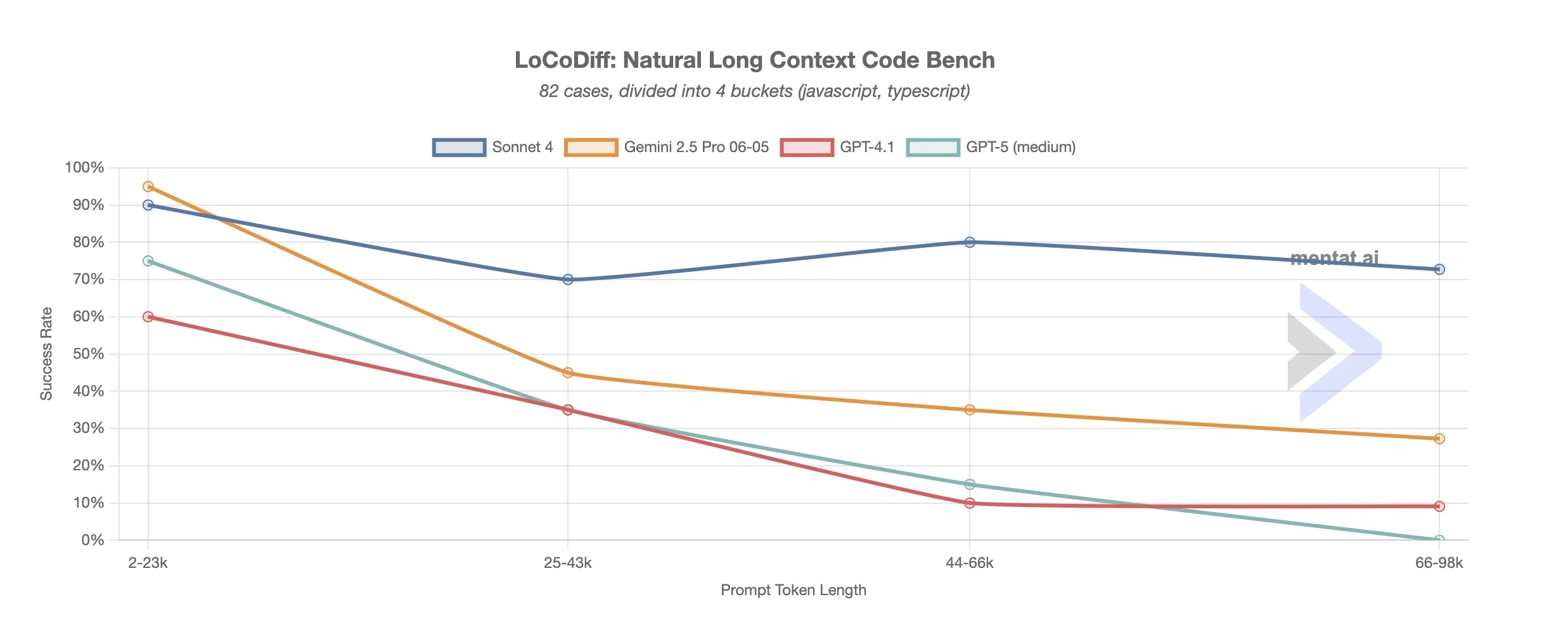
While there are anomalies along the way, the success trends down with context size, with Claude holding up the best.
Keep prompts concise, but with a balance of providing the AI enough context to know what to do.
Too Little Context
On the other hand, providing minimal context deprives the AI of the information it needs to generate useful results. For instance, asking it to write a function without explaining its purpose or the expected input/output can lead to generic or incorrect code.
Pro tip: Start small with context. If the AI gets confused, add more — just like you would when explaining code to a junior dev.
Tips for Managing Context:
- Provide only the relevant parts of the codebase or task.
- Use comments to explain the purpose of the code or the task.
- Be specific about what you want the AI to do.
- If specific domain knowledge is required, provide a concise summary
Keep prompts concise, but with a balance of providing the AI enough context to know what to do.
Of course, context alone isn’t enough. Even with the right code in front of it, an AI can still go off the rails if your request is too vague. That’s where specificity comes in.
Be Specific
As software engineers, we are no strangers to asking for and writing requirements–working with AI will be no exception. As a general rule, the more specific you are with your prompt, the higher the chance of success.
A good way to gauge the chance of success for a particular prompt is to ask: How likely would a junior developer with minimal knowledge of the codebase complete this task?
The amount of wiggle room you have with your prompts will vary wildly between different models, but also different tools. VSCode’s agent mode tends to require a lot of guidance, while Cursor and terminal tools such as Claude Code or Opencode tend to have varying levels of ability to break the task down further and discover what they need from the codebase.
Example: Instead of asking the AI to “build a user authentication system,” break it down into smaller tasks:
- Use bcrypt to hash and verify passwords.
- Use JWT to generate and verify tokens for session management.
- Use zod to validate user input
Knowing When to Use Them
AI coding tools can be powerful but they are not a panacea. Knowing what sorts of tasks they excel at—and conversely, what they struggle with—has been my personal biggest gain in productivity.
I learned this the hard way. One time, I was debugging response times from our API and wanted to use curl to measure TTFB, but I wasn’t very familiar with terminal commands that could do that for me. I gave the AI a quick description of what I needed, and it generated a bash script in a few seconds that would’ve taken me much longer to figure out by Googling and stitching snippets from Stack Overflow. That’s when it clicked for me: AI is best at shaving off the grunt work, letting me get back to the real task at hand.
On the flip side, when I asked it to help debug a tricky frontend performance issue, it fell short. It suggested several plausible fixes, and even rapidly implemented them when asked to, but none of them actually ended up improving the performance nor addressed the root cause. Before I knew it, I spent longer on trying to craft the non-existent perfect prompt to get it to work than it would have taken me just to run a performance profile and see what was going on. It was great at the small, scoped task of writing that script from before, but as soon as more complex logic or debugging is required, it starts to spin its tires.
What AI tools are great at:
- Explaining code (regex, unfamiliar syntax)
- Generating boilerplate (CRUD, markup from screenshot)
- Small refactors (extracting functions)
- Writing tests (happy path + edge cases)
- Parsing large text (logs, JSON)
Where they fall short:
- Complex business logic
- Code spread across many files
- Debugging deeply nested runtime issues
- Large-scale refactors
How to Get a Feel for It:
Using AI effectively takes practice. Start with small, low-stakes tasks to understand its strengths and weaknesses. Over time, you’ll develop an intuition for when to rely on AI and when to tackle a task yourself.
AI as Your Partner, Not Your Replacement
AI tools are a great addition to your developer tool belt, but they’re not a replacement for critical thinking or expertise. The more I’ve used them, the more I think of AI as a partner–a speedy, never-tiring junior who still needs direction. It can move fast, it can take care of the boring parts, and sometimes it even surprises you with a clever solution. But it still needs guidance, context, and review.
Key Takeaways:
- Provide the right amount of context.
- Break tasks into manageable pieces to improve results.
- Get a feel for what tasks it excels at
Start small, experiment, share your learnings, and don’t be afraid to iterate. The more we talk openly about what works (and what doesn’t), the faster we’ll all get better at using these tools.